RELY-TSN.Configurator — TSN network configuration tool
Software that configures a whole TSN network from one place. It acts as the CNC (Centralized Network Configuration) defined in IEEE 802.1Qcc.
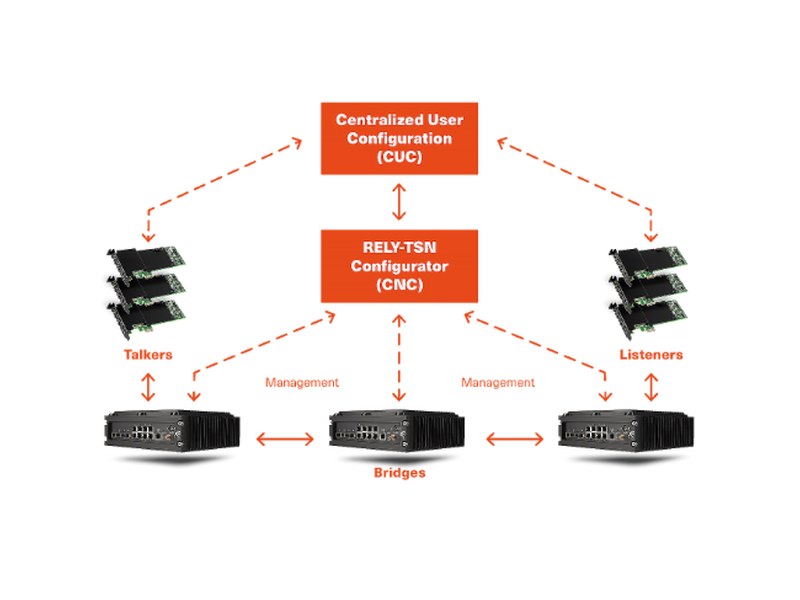
Overview
In a TSN network, the settings of switches and endpoints must be consistent. RELY-TSN.Configurator discovers the network topology, derives the configuration for each device from the traffic requirements and distributes it. Requirements for talkers and listeners come from the CUC (Centralized User Configuration).
Key specifications
- Role
- IEEE 802.1Qcc CNC (Centralized Network Configuration)
- Protocols
- NETCONF / YANG, topology discovery via LLDP
- Configured features
- IEEE 802.1Qbv (TAS) schedules, 802.1Qav (CBS), 802.1CB (FRER), 802.1Qci, VLAN, priority mapping
- Supported devices
- RELY-TSN switches and TSN endpoints
- Interface
- Web-based GUI with network topology visualisation
- Delivery
- Software license (single-computer / floating). Perpetual license with 12 months of support & maintenance and initial training included
- System requirements
- Windows 8.1/10 (32/64-bit), Linux 64-bit (Debian 9, Ubuntu 16.04+), macOS 10.11+, Java 8+, 4-core CPU / 8 GB RAM or more
- Export
- XML-YANG / Excel / CSV; delivered to devices via NETCONF
Frequently asked questions
What does the tool do?
It discovers the TSN network topology, derives the configuration for each switch and endpoint from the traffic requirements, and distributes it. You no longer configure each device individually.
What is the difference between CNC and CUC?
The CUC collects traffic requirements from the application side; the CNC translates those requirements into device configuration. This tool is the CNC.
Which devices are supported?
The RELY-TSN switches and TSN endpoints. Let us know the configuration you plan to use.
What about licensing and delivery?
We will confirm the delivery form and licence terms with the manufacturer when you enquire.
RELY-TSN.Configurator — enquire
We can discuss configuration, lead time and availability.
RELY-TSN.Configurator — enquire →